How to reset (local) passwords on laptops, default passwords provided by Study Tech.
Good starting places for password issues.
The one way we CANNOT HELP RESET A PASSWORD.
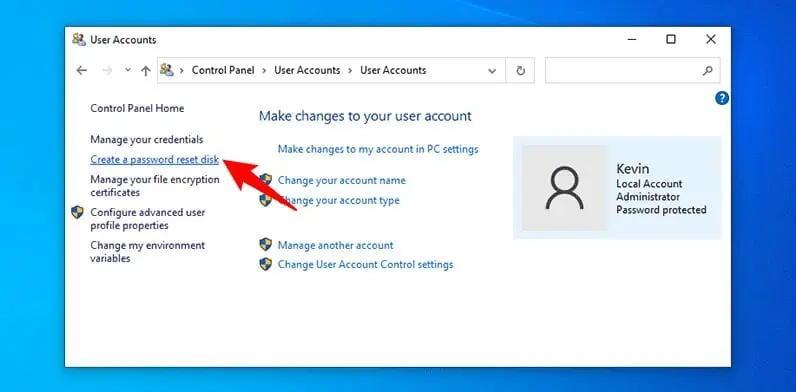
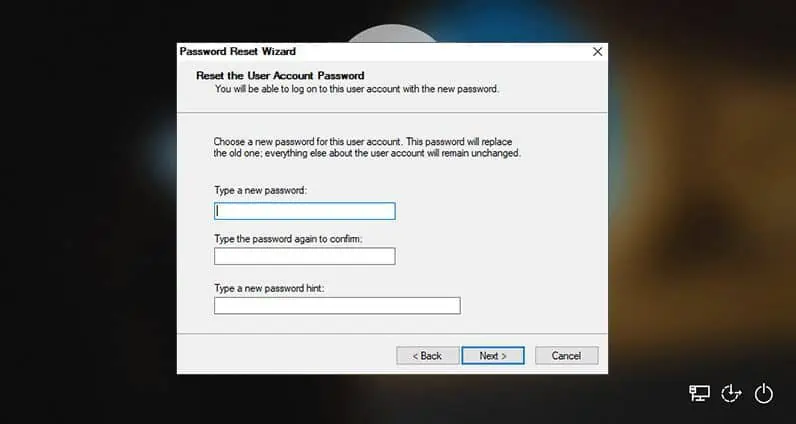
A local Windows account password can’t be reset remotely because the password is stored and validated only on the device itself, with no external authentication authority that can be contacted from outside. Everything about a local account is self‑contained, and that design creates several hard technical boundaries.
How local accounts store and validate passwords
Local accounts use the Security Accounts Manager (SAM) database on the machine.
The SAM is encrypted and tied to the device’s hardware.
Password hashes never leave the machine.
No cloud service, domain controller, or remote API has a copy of the credentials.
Because nothing external knows the password or its hash, there is no remote mechanism to overwrite it safely.
Why remote reset isn’t allowed
1. No trust chain exists
Remote password resets require a trusted identity authority (Azure AD, AD DS, Apple MDM, Google Workspace). Local accounts have no identity provider, so Windows has no way to verify that a remote request is legitimate.
2. Security boundaries prevent remote tampering
Allowing remote password resets for local accounts would create a major attack vector:
Malware could reset passwords remotely.
Attackers could lock out users without needing physical access.
RDP brute‑force attacks could escalate into full account takeover.
Microsoft intentionally restricts this to avoid catastrophic compromise.
3. Encryption ties the password to the device
The password is part of the key material used for:
DPAPI (Data Protection API)
Credential Manager
EFS (Encrypted File System)
Changing the password incorrectly or externally could break access to encrypted data. Windows therefore requires the reset to happen locally, where it can safely re‑derive keys.
4. No remote API exists for local accounts
Domain accounts → reset via Active Directory Microsoft accounts → reset via Microsoft’s cloud Local accounts → no remote endpoint exists
Windows simply doesn’t expose a remote password‑reset interface for local accounts.
What can be done remotely
There are only two legitimate remote options, and both require prior preparation:
Remote management tools (Intune, RMM, MDM) can reset Azure AD / Entra ID or domain passwords, not local ones.
LAPS (Local Administrator Password Solution) can rotate a managed local admin password, but only because the device reports the password to a directory service first.
Neither applies to arbitrary local user accounts.
When you can reset a local password
A local password can only be reset when:
You have physical access, or
You have another admin account on the machine (local or domain) and can connect via RDP/WinRM/PSRemoting after authenticating.
Even then, the reset happens on the device, not through a cloud service.
Possible passwords set by Study Tech.
Local Password reset help
Use Advanced Startup & Command Prompt
Third-party bootable tools (semi advanced, for those IT support comfortable).
- Applications like Hiren's Boot CD, Gandalf, Strelec, Medicat, PCUnlocker, or Trinity Rescue Kit that run from a USB drive and provide tools to reset a Windows local password.
- Can reset passwords even if you didn't create a reset disk beforehand.
- Requires a separate, working computer to download the tool and create the bootable USB drive.Some tools, like PCUnlocker, may require a license for full functionality.
- Require secure boot, fast boot and Intel optane/SSD virtualisation to be disabled in most instances.
- Will require a bitlocker key or similar for any bitlocker secured drive.
How to do use a third party tool (general steps):
- Download a tool like Hiren's Boot CD, Gandalf, Strelec, Medicat, PCUnlocker, or Trinity Rescue Kit and Rufus to create the bootable drive on a working computer.
- Use Rufus to create a bootable USB drive from the tool's ISO file.
- Insert the bootable USB into the locked computer and restart it.
- Enter the computer's BIOS/UEFI and change the boot order to prioritise the USB drive, boot from it and disable fast boot, secure boot and any SSD/HDD virtualisation to allow the USB to "see" your computers "c Drive/Operating System drive".
- The system will boot into the bootable tool's environment, where you can select a password reset utility to unlock the account.
You can watch this video to learn how to reset a Windows password using Hiren's Boot CD:
Online password reset help.
Other, less common federated MACOS or Windows login providers, some used with/by/for some University accounts
| Provider | Reset Page / Guide |
|---|---|
| Microsoft Entra ID | Microsoft Online Password Reset |
| Google Workspace | Google Workspace Admin Password Reset Guide |
| Okta | Okta Password Reset Portal |
| Ping Identity | PingID Admin Password Reset Guide |
| Auth0 | Auth0 Password Reset Overview |
| Apple Business Manager | Apple Business Manager Password Reset Guide |
Additional info from external sources
Related Articles
I cannot login/signin/sign in/log in to the Study Tech website, app, register another app, DSA provided software, another software providers website, or am unable to action a password reset, 2FA,MFA or similar.
A high percentage of sign in or login issues, regardless of website, app or anything you attempt to sign in or up to will be alleviated or fixed by using another device and/or browser. A good general rule, on first signing up to something, or ...Network Domain Policies from Universities and Employers – Conflicts on Personal & DSA Devices
Modern users—particularly students and staff—often sign into multiple managed environments on a single device. These can conflict, install along with software, EG: Office and Onedrive, Claro or Everway software, some other software. University ...Welcome pack sign in
Good starting places for password issues. Some laptops will have no password/can be accessed by just pressing enter. If a Mac/a password was required: We are aware that non or poorly configured University policies can affect laptops/break passwords ...How to install Mindomo on your DSA awarded laptop or Apple Mac
General install and validation notes. Download the Mindomo app for your Operating system/device, scroll down until you see WIndows, Mac etc listed. Install on your device, then use your 8 digit or 25 digit key in app: Mindomo Desktop → “i” icon → ...I get a connection or invalid error when trying to use the Study Tech app or website online.
I am experiencing issues signing into the Study Tech website, booking an assessment, training session etc. For Example: I encounter an error while trying to login/sign in to the Study Tech APP or Website. I have created an account but get this ...